*By Jennifer Zhang*
Omron's SYSMAC range covers two generations of controllers that still run thousands of machines daily: the CP1E compact all-in-one PLC on packaging machines, pumps and small OEM equipment, and the CJ2M modular rack PLC handling larger machines with dozens of I/O units and EtherNet/IP networks. When either controller stops, the fastest way back to production is reading the ERR/ALM indicator, the four-digit code in word A400, and the CX-Programmer PLC Error window. This guide covers every error class the CP1E and CJ2M report, with verified code values from Omron's own manuals (W479 hardware manual and the CJ2 CPU Unit Software User's Manual).
Please check our Omron and industrial automation PLC parts collection for CPUs, I/O units, expansion units and batteries in stock.

- POWER lit, RUN off and ERR/ALM lit means a fatal error: program execution stops and all outputs turn OFF. ERR/ALM flashing while RUN stays lit means a non-fatal error — the program keeps running. - INH lit means Output OFF Bit A500.15 is ON, holding every output OFF. - The most serious current error code is stored in A400; fatal flags sit in A401, non-fatal flags in A402, and detail words A403, A404, A407, A410–A423 pinpoint the exact unit or area. - The error log in A100–A199 keeps the last 20 errors with timestamps. Read it first on a machine that "recovers by itself". - FAL(006) raises a non-fatal error from your ladder; FALS(007) raises a fatal one. FAL codes register as 4101–42FF, FALS codes as C101–C2FF.
Fault Manifestations: CPU stops, RUN dark, A400 = 80F1 hex. Detail bits in A403 localize it: .00 = user program checksum error, .01 = I/O memory corrupted, .04 = PLC Setup checksum error, .10 = backup memory problem.
Root Causes: Power interruption during a program write; the backup capacitor failed to carry I/O memory through a long power-down; or genuine CPU hardware failure.
Repair Steps: Re-transfer the ladder with CX-Programmer. If A403.04 is set, re-transfer the PLC Setup too. For A403.01, re-initialize DM and Holding Areas, turn OFF flag A509.13 (I/O Memory Corrupted) and re-download. If the checksum error returns immediately after every transfer, the flash or CPU hardware is bad — replace the unit. A CPU that loses its program after every long power-down is a pre-failure symptom; order the replacement in advance.
Fault Manifestations: A400 = 80F0, CPU stopped. Cause bits identify the violation: UM overflow, illegal instruction, differentiation overflow, task error, no END, illegal access, indirect DM/BCD error or instruction error. A298/A299 hold the offending program address.
Root Causes: Almost always software — a missing END after an edit, a deleted task still referenced elsewhere, BCD addressing into a non-BCD area, or a program larger than the CPU's step capacity.
Repair Steps: Go online in PROGRAM mode, read the address from A298/A299, correct the instruction and re-download. Verify program size after every edit — older CJ1M-to-CJ2M conversions frequently overflow when copied without trimming.
Fault Manifestations: CJ2M shows 80C0–80C7, 80CE or 80CF with the failing I/O word in A404; CP1E uses 80CA, and a CP1W expansion fault registers as 0A0A. The CPU stops because the I/O image is no longer trustworthy.
Root Causes: A poor CPU-to-I/O connection: an expansion connector loosened by vibration, contaminated or bent contacts, a bridging terminal cover, or a damaged CP1W cable. On recently serviced racks, a unit reseated slightly off its guide is the top cause.
Repair Steps: Power down. On CJ2M, reseat every unit, clean connectors, close terminal covers, and re-plug the unit flagged in A404. On CP1E, inspect the expansion cable at both ends — the CP1W-CN811 connecting cable is a stock spare worth keeping, because a cable flexing on a vibrating panel is a recurring failure point. Power up and confirm A400 returns to 0000. If the error follows one unit through reseating and cable swaps, replace that unit.

Fault Manifestations: 80E0 (I/O table does not match the actual units), 80E1 (Too Many I/O Points, detail in A407.13–.15), 80E9 (Unit Number Duplication, number in A410–A416) or 80EA (Rack Number Duplication, A409).
Root Causes: A unit added or swapped without transferring a matching I/O table; total I/O beyond the CPU's capacity; two Special I/O or CPU Bus Units sharing one unit number; a rack allocation edited twice.
Repair Steps: For 80E9/80EA, read the duplicated number from A410–A416 and set one unit's rotary/DIP switch to a free number. For 80E1, count real I/O and upgrade the CPU or redistribute points. For 80E0, create the I/O table from the actual unit configuration in CX-Programmer and transfer it. These are configuration errors — no hardware replacement fixes them.
Fault Manifestations: CPU stops with 809F in A400 after the scan exceeded the cycle monitoring time in the PLC Setup (default 1 s on many models).
Root Causes: A program grown past its scan budget — long loops, heavy PID or string processing, or an interrupt task storm from a misconfigured communications unit.
Repair Steps: Read the actual cycle time and compare with the setup value. Raise the monitoring time to a sensible margin (a legitimate 300 ms scan needs 500–800 ms), or optimize: move slow loops into timed interrupt tasks and batch communications.
Fault Manifestations: On CJ2M, 0200–020F flags a CPU Bus Unit Error (unit number in A417); 0300–035F flags a Special I/O Unit Error (A418–A423); 0400/0500 variants flag setup errors. Depending on PLC Setup, they may stop the CPU or just raise the error.
Root Causes: Data exchange failure with the unit — failed unit electronics, a marginal connector, or configuration data out of range.
Repair Steps: Identify the unit from the Auxiliary word, restart it via CX-Programmer, and watch whether the error re-registers. A unit that errors again after restart should be swapped. For CPU Bus units, also verify version compatibility (0x80F2 covers that class). Keep common I/O spares such as the CJ1W-ID211 16-point DC input unit on hand — one of the most frequently ordered CJ-series spares, and it slots straight into a CJ2M rack.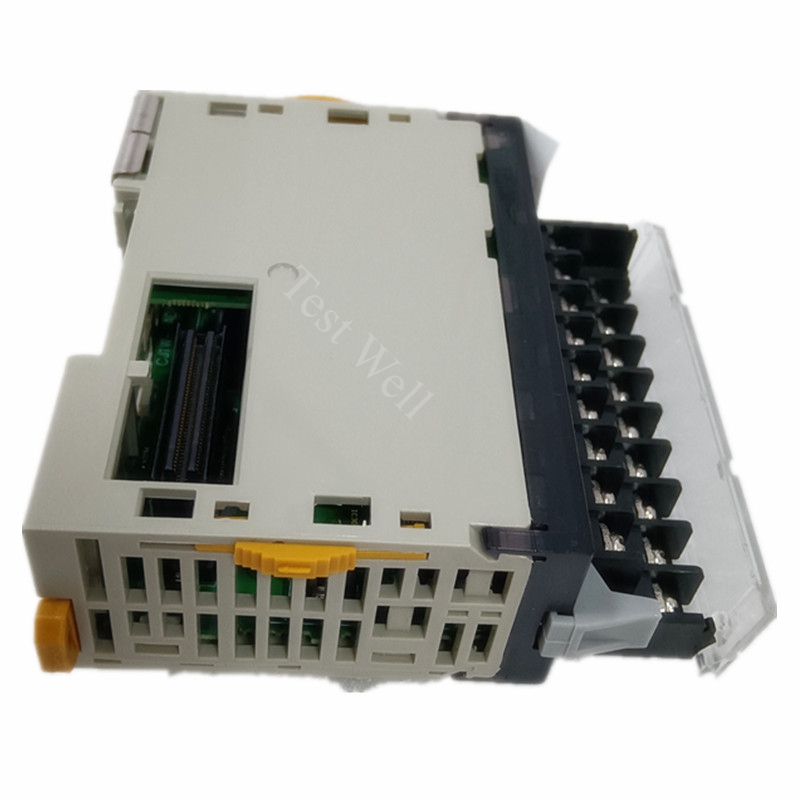
Fault Manifestations: RUN stays lit and ERR/ALM flashes. Codes: 00F7 (Battery Error), 009A (Basic I/O Unit Error, A408), 009B (PLC Setup Error, A406), 00D1 (Option Board Error), 00F1 (Backup Memory Error, A315.15), or 4101–42FF (FAL executed by your own ladder).
Root Causes: Battery past its ~5-year service life; a basic I/O unit reporting a minor internal fault; a setup parameter out of range after a hardware change; or your own diagnostics firing FAL deliberately.
Repair Steps: For 00F7, replace the battery within one week or memory contents are at risk — the CJ1W-BAT01 replacement battery is a direct fit for CJ-series CPUs and is replaced with power ON. For 009A/009B, read the flagged unit/address, re-transfer correct parameters, and replace the unit only if the flag persists.
- Error follows the CPU (80F1 checksum returns immediately, watchdog failure, LEDs dead) → replace the CPU. For legacy CJ1M lines, the CJ1M-CPU21 CPU unit is a like-for-like drop-in preserving rack and program. - Error follows one expansion or I/O unit through reseating → replace that unit; the CP1W-20EDT expansion I/O unit covers the common CP1E 12-in/8-transistor expansion need. - Configuration errors (80E0/80E1/80E9) → fix tables and switches; replace nothing.

1. Battery schedule: replace CJ-series batteries every 5 years, logged — the 00F7 alarm already means memory is at risk. 2. Program backup: after every change, save the CX-Programmer project AND write a memory card; an 80F1 with no backup turns a 30-minute recovery into a multi-day rebuild. 3. Connection audit: annually power down and reseat every rack unit and expansion connector on vibrating machinery; most 80C0/80CA events are born here. 4. Error log review: monthly, dump A100–A199. A rising 009A or intermittent bus-error count predicts the next downtime. 5. Scan budget: re-check cycle time after every program change so 809F never surprises you mid-production.
Q: What does steady versus flashing ERR/ALM mean on a CP1E? A: Steady with RUN off = fatal error, CPU stopped (A400 holds the code, e.g. 80F1). Flashing with RUN on = non-fatal, program still executing. Start with A400 either way.
Q: Where do I find the error code if my CP1E has no display? A: Only the CP1H has a 7-segment display. Connect CX-Programmer and open the PLC Error window, or read A400–A403 from the Auxiliary Area online.
Q: My CJ2M shows 80F1 with A403.00 set after a brownout. Is the CPU dead? A: Not necessarily. Re-transfer the program; if the checksum error returns on every transfer, replace the unit.
Q: Are CJ1 I/O units usable as CJ2 spares? A: Yes — CJ1 basic I/O units such as CJ1W-ID211 and CJ1W-OC211 work directly in CJ2 racks; that is the standard refresh path for a CJ1 machine getting a CJ2M CPU.


